The email MCP server for your AI agent Claude, Codex and Cursor can run all of it.
Connect your assistant over MCP and it sends email, answers replies and manages contacts through your own Amazon SES. Free for life. With Premium it runs campaigns and automations too.
No card. One-click deploy into your AWS. Free for life.
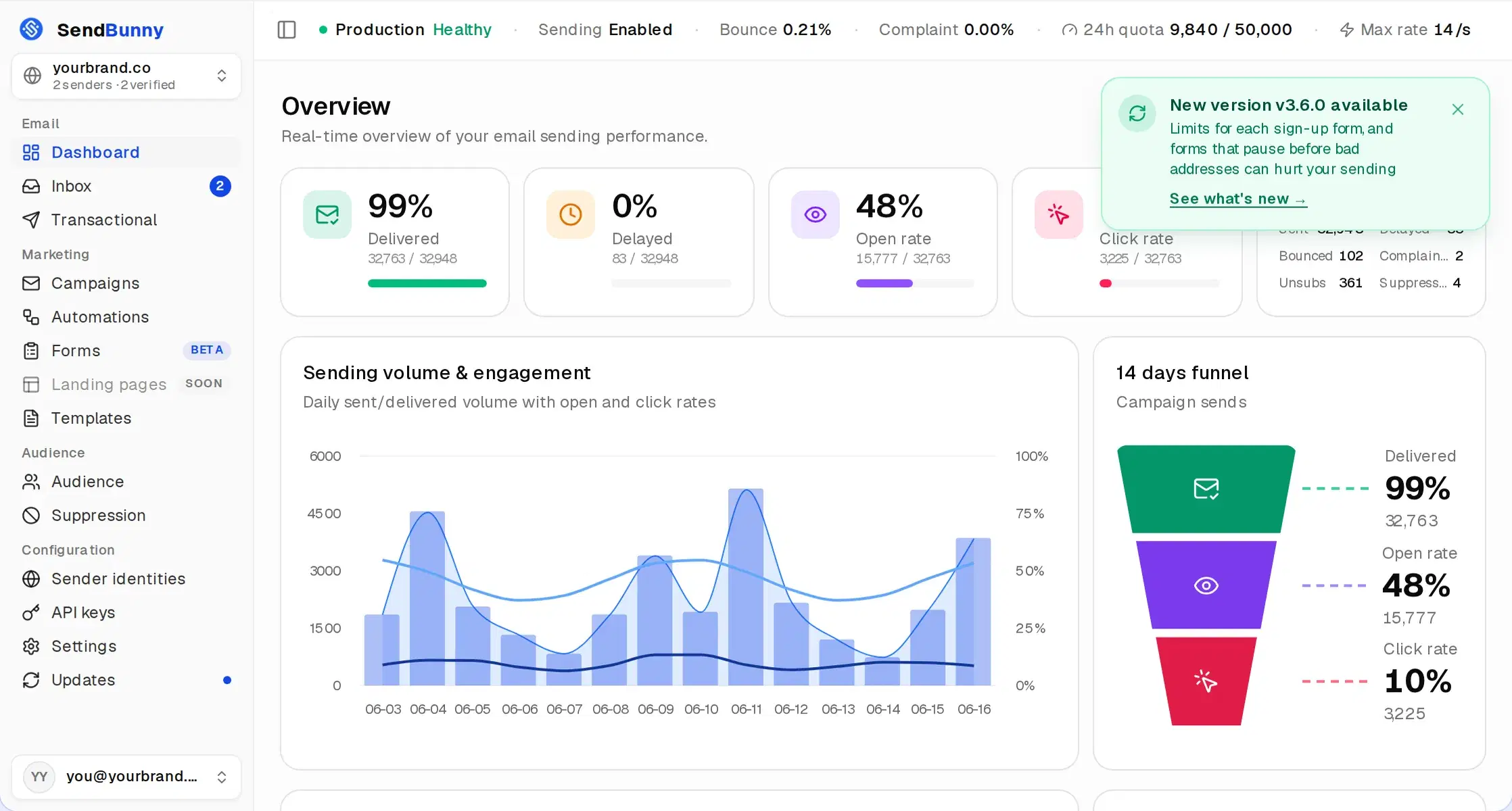
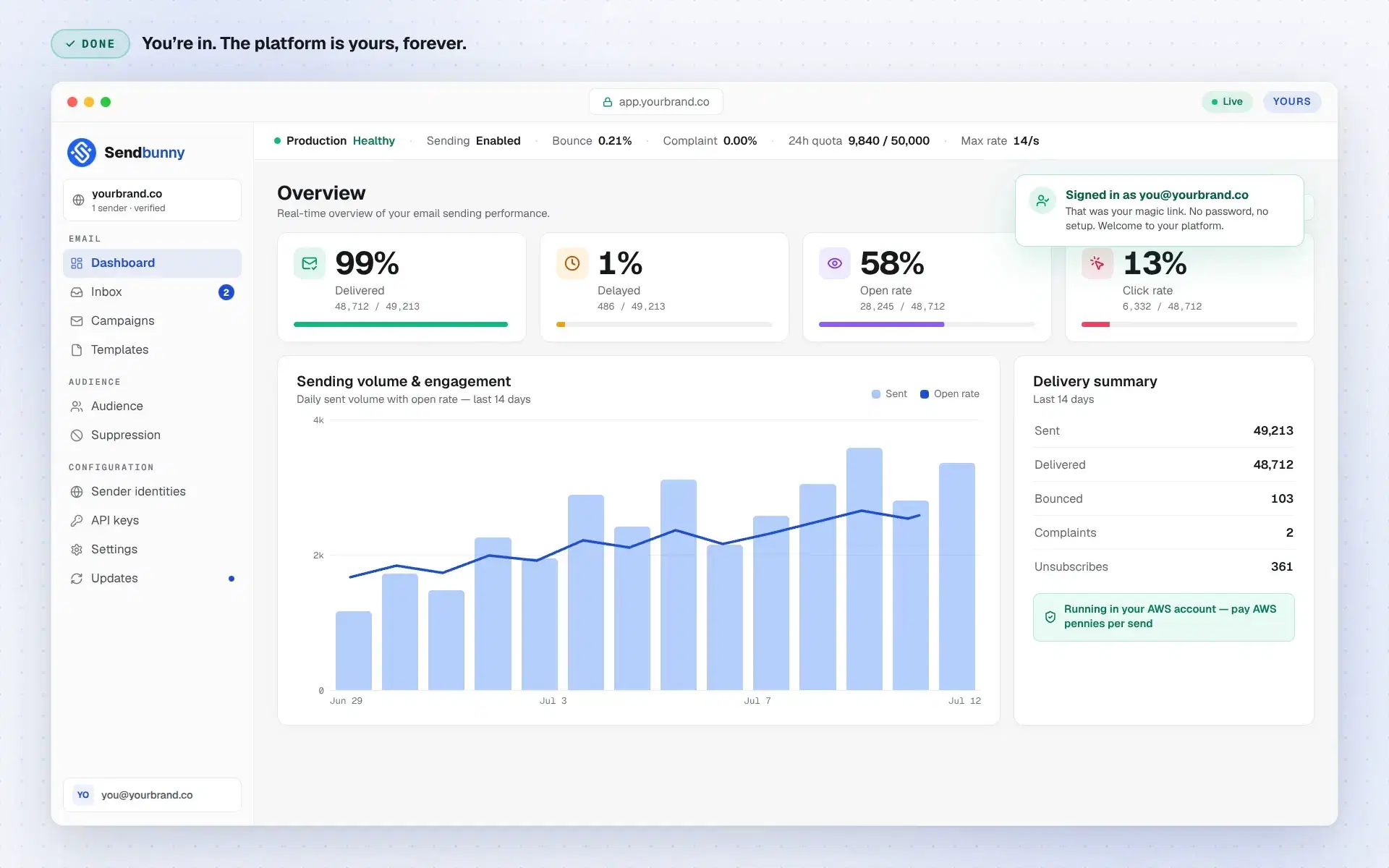
app.yourbrand.coInteractive demo
Seeded with demo data. Your install starts empty and fills up with your own sending.
$0.10
per 1,000 emails
$0
monthly platform fee
~10 min
click to live
100%
in your AWS account
Email MCP server for AI agents
Your AI agent can run all of it.
Connect Claude, ChatGPT, Codex or Cursor over MCP and it can do anything you can do in the dashboard, from building a segment to publishing a sign-up form. You decide what it may touch.
Works with the assistant you already useClaude (claude.ai and the Claude app), Claude Code, ChatGPT, Codex, Cursor and VS Code connect over MCP. Paste one URL, sign in, done.
Everything, not a cut-down API182 tools cover campaigns, automations, segments, forms, landing pages, contacts, imports, the inbox, templates, webhooks and settings.
You set the limitsChoose Send mail, Inbox or Full for each domain. Disconnect an agent any time from API keys.
It asks before it deletesEvery tool says whether it reads, changes or deletes, so your assistant knows when to check with you first.
You see every changeWhat an agent does shows up in your open dashboard at once, and in the activity log.
Give your AI agent its own email.
Point support or sign-up questions at an address on your own domain, and your agent reads and answers them over MCP.
Its own address on your domainAdd one like agent@yourcompany.com in SendBunny, or ask your agent to add it. Mail to it lands in SendBunny.
It reads, replies and writesWith Inbox access it reads its mail and answers in the thread. With Full access it also starts new emails.
You see every messageIts mail sits in your SendBunny inbox too, so nothing it sends or gets is out of sight.
No terminal, no YAML, no AWS expertise. If you can click a button, you can do this. Watch the whole thing:
Before you start: an AWS account with Amazon SES production access. New AWS accounts start in a test mode that only emails addresses you have verified, and Amazon gives full access once it has reviewed your request. Not sure where you stand? Ask us.
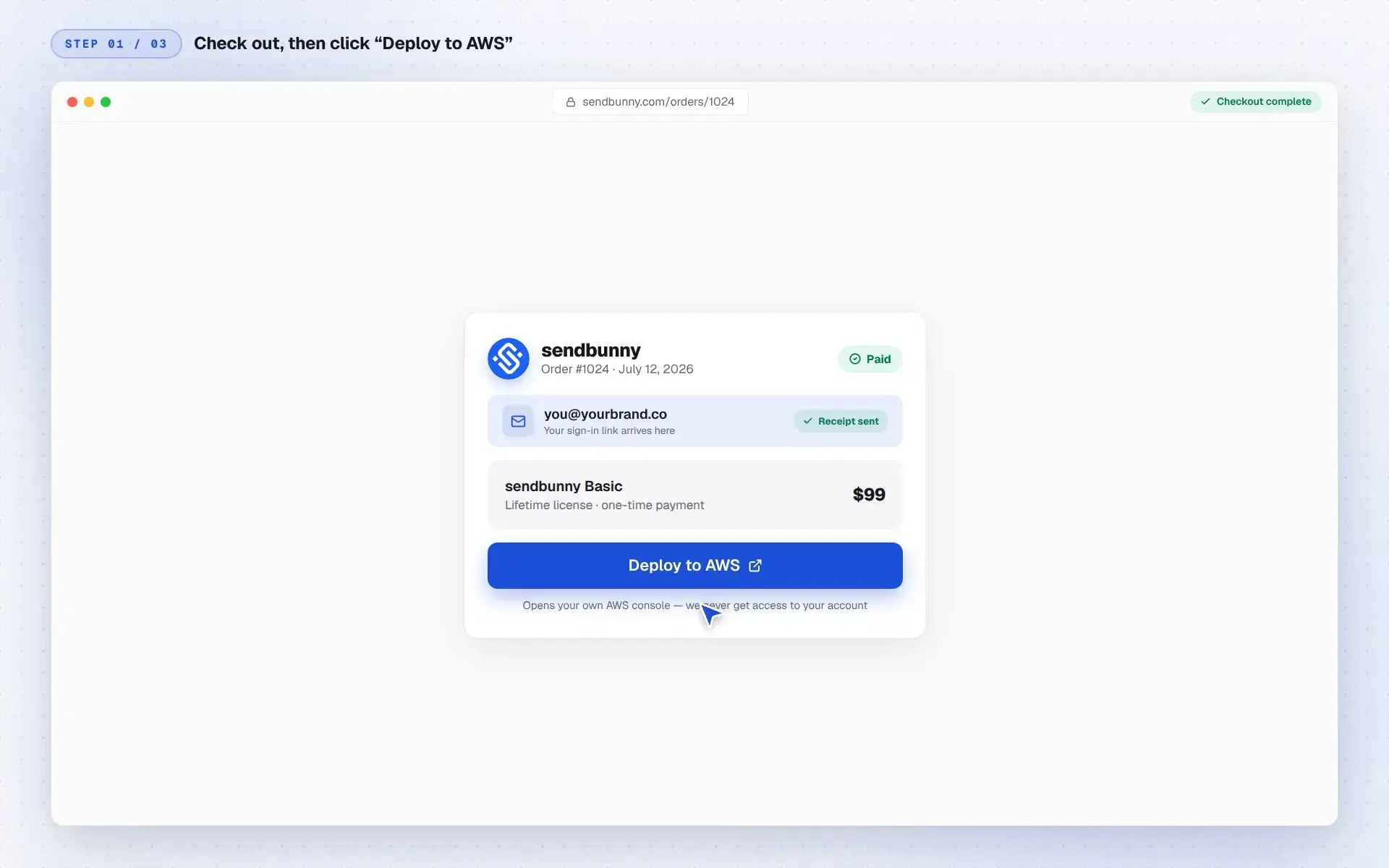
1Click “Deploy to AWS”Check out with your email. Your order page then shows one button that opens your own AWS console, everything pre-filled.
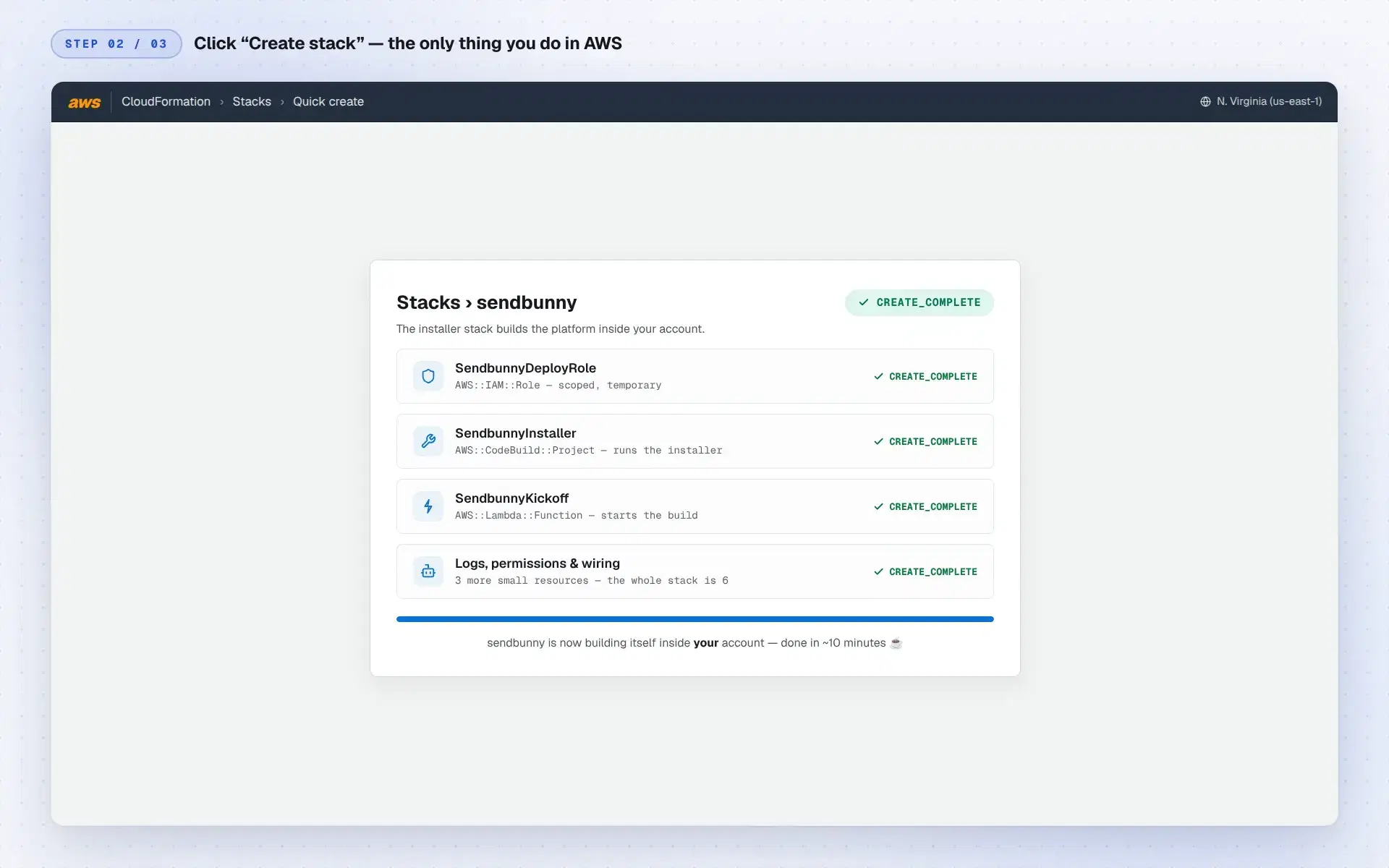
2Click “Create stack”The only thing you do in AWS. A tiny, readable installer stack of six resources builds the platform inside your account in about ten minutes.
3Open your emailWe send a magic sign-in link to the email you used at checkout. One click opens your dashboard at your own URL, already signed in. It's yours, forever.
The installer stack is six readable CloudFormation resources. Audit it before you click. Your credentials never leave your account.
Stay current
Updates ship to your app. You just click.
When we release a new version, a banner appears in your dashboard. One click re-runs the installer inside your AWS account, backend first and dashboard swap last, so a failed update can never take your platform down. No console, no commands, no AWS knowledge.
Let the updates subscription lapse? Your platform keeps running forever. You simply stop receiving new features until you renew.
app.yourbrand.co/updates
New version v3.16.0 available
v3.16.0: Landing pages at a glance
Updates included with your subscription
Update now
Pricing
Free for life.Premium, $199 once.
SendBunny Free is free for life, with updates and bug fixes included. Premium adds every marketing tool for $199, once, and its optional updates plan keeps it current.
One-time only+ Updates plan (optional)Recommended
SendBunny Free
$0
Free for life · No card
Updates and bug fixes, for life
Included. Nothing to pay and nothing to look after.
Campaigns, automations, forms, landing pages, segments, topics and smart inbox sorting are Premium.
SendBunny Premium
$199
Once, yours for life
Optional updates plan, $99 a year
Updates, bug fixes, and new features
Unlimited emails, contacts, and domains
Campaigns, templates, automations, and segments
Unlimited landing pages and forms, with bot protection
Bring your list from any email tool
Inbox to send/receive emails
Transactional email API and webhooks
AI agents can run every feature, via MCP
Notion-style editor, or drop to HTML
Real-time analytics dashboard
Subscription topics and a preferences page
One-click deploy into your own AWS
Your data never leaves your account
Priority support
All upcoming features
Billed $199 now + $99/year
Without the updates plan, your install stays on the version you buy.
You need an AWS account with Amazon SES production access to email your list. No access yet? Ask us and we help you get it.
What happens to Premium without the updates plan?
You own the version you deployed, forever. It keeps working as long as your AWS account is active. You just won't receive future bug fixes, security patches, or new features unless you add or renew the updates plan at any time. SendBunny Free gets every update at no cost.
Prices in USD. AWS usage (≈ $0.10 per 1,000 emails) is billed directly by Amazon. The updates plan renews yearly; cancel anytime.
FAQ
Questions before you own it
Straight answers. Then checkout when you are ready.
What is an email MCP server?
MCP is how an AI assistant such as Claude, Codex or Cursor uses another app. SendBunny's MCP server lets the assistant send email, answer replies in the inbox and manage contacts, with the access you give it. With Premium it also runs your email marketing: campaigns, segments, automations and sign-up forms.
Can Claude send email through MCP?
Yes. Add SendBunny's MCP URL to Claude Code or Claude Desktop and sign in. Claude can send a single email with send_email, or, with Premium, create a segment, write the template, send you a test and schedule the campaign.
Does it work with Codex, Cursor and VS Code?
Yes. Codex takes two lines in its config file, Cursor and VS Code take a small JSON entry, and the first connection opens a sign-in page in your dashboard. Clients that send headers can use an API key instead.
Is it safe to let an AI agent run my email?
You choose Send mail, Inbox or Full for each domain, and you can disconnect the agent at any time. Every tool says whether it reads, changes or deletes, so the assistant knows when to check with you first, and every change shows up in your dashboard and the activity log.
What does it cost?
Nothing to us: the MCP server is part of SendBunny Free, for life, with no AI surcharge. Emails cost what Amazon SES charges, about $0.10 per 1,000. Premium adds campaigns, automations, segments and forms for $199 once; its yearly updates are an optional $99.
Can the agent read and answer replies?
Yes, with Inbox or Full access. It lists conversations, reads a message and replies in the same thread from your own domain.

 Email MCP server