
Coding agent send-only emailSet up scoped sending without giving the agent inbox access.
Grant scopes and MCP connect steps last verified 2026-09-01
In short
Give a coding agent send-only access when it sends receipts or alerts without reading inbox mail. Pick **Send mail** on an MCP grant or an API key scoped to `email:send` for one domain, store the credential in a secrets manager, and set recipients in your app, not from model output. Best for unattended sends where recipients are fixed outside the model.
What does send-only email access mean for a coding agent?
Send-only on a Send mail grant means the agent can send transactional mail through POST /api/v1/emails or the MCP send_email tool. It cannot use Inbox or Full tools: no listing inbox conversations, no reading inbox message bodies, no contact or campaign changes. If the session is hijacked, the attacker can send from your verified addresses on that domain but cannot browse your inbox or audience data through Inbox or Full grants.
That is different from the inbox products that dominate search results. AgentMail, email-agent-mcp and most Gmail OAuth tutorials wire read plus send by default. They are the right shape when the agent must triage mail. They are the wrong default when you only want password resets, deploy notifications or receipt emails from your app.
The threat model for why read-plus-send is dangerous is on /guides/ai-agent-email-permissions. This page is the setup: how to wire send-only in about thirty minutes.
When is send-only enough? The Rule of Two for sending
Meta's Agents Rule of Two (October 2025) says an agent may satisfy at most two of three properties in one session: [A] it processes untrustworthy inputs; [B] it can reach sensitive systems or private data; [C] it can change state or communicate externally.
A transactional send agent has property C (it sends email). It should not also have A (reading mail from strangers) or B (your inbox or contact list) in the same session. Receipts, magic links, deploy alerts and webhook-driven notifications are all two of three: external communication without reading untrusted mail or your private list.
| Agent job | Needs inbox read? | Needs send? | Unattended OK? |
|---|---|---|---|
| Password reset or receipt email | No | Yes | OK with fixed recipients and send-only scope |
| Deploy or CI notification | No | Yes | OK, same |
| Inbox triage summary | Yes | No | OK if no send tool in the same session |
| Reply to a customer thread | Yes | Yes | No. Draft gate required (see the permissions guide) |
Rule of Two applied to sending jobs. Full threat model: /guides/ai-agent-email-permissions.
The three grant levels: Send mail, Inbox and Full
On a SendBunny install, every agent connection gets one of three presets, scoped to the domains an admin chooses. Pick the smallest preset that covers the job.
| Grant | Can send? | Can read inbox? | Typical agent job |
|---|---|---|---|
| Send mail | Yes | No | Transactional API, alerts, receipts, magic links |
| Inbox | No autonomous send | Yes | Triage and summaries; replies prepared as drafts for human review |
| Full | Yes | Yes | Everything the API can do on the chosen domains, including starting campaigns and deleting or exporting contacts (use sparingly) |
For a coding agent that only fires transactional mail, choose Send mail for one sending domain. Disconnecting from the dashboard revokes access within a minute. Grants are per domain today, not per inbox address, so two agents on the same domain share the same grant. Per-inbox grants are not available today.
API key or MCP grant?
Both paths hit the same /api/v1 API. The difference is how the agent authenticates and who approves the scope.
| Scoped API key | MCP grant (OAuth) | |
|---|---|---|
| Best for | Your backend, CI scripts, headless agents | Claude Code, Cursor, Codex, VS Code |
| Auth | x-api-key: <API_KEY> in env or secrets manager | Sign in in the browser; admin picks grant on consent screen |
| Scope | Scopes chosen at key creation; select only email:send for send-only | Admin picks Send mail, Inbox or Full per domain |
| Revoke | Delete or rotate the key in Settings | Disconnect on the Agents (MCP) tab; effective within a minute |
Never paste either credential into the model context, a committed config file or a chat log. Use a secrets manager or your host's secret store. Bastion's March 2026 survey found 22% of MCP server docs still recommend plaintext .env files; treat that as a last resort on a laptop, not in production.
Connect Claude Code or Cursor over MCP (send-only)
The in-app connect guide covers Cursor, Claude Code, Claude Desktop, Codex and VS Code. The steps below are the send-only path.
- An admin opens Settings → API keys → Agents (MCP) on the install.
- The developer runs the connect command (replace
YOUR-INSTALLwith the CloudFront hostname from the API keys page). - The browser opens for OAuth sign-in. An admin approves Send mail for the sending domain only.
- The agent's first call on any grant is
list_domains. Then it may callsend_emailfor verified From addresses on that domain.
claude mcp add --transport http sendbunny https://YOUR-INSTALL/api/mcp
# sign in in the browser; admin picks Send mail for chosen domains
# first call: list_domains
Create a scoped API key (send-only)
For a backend service or a headless agent on a VPS, an API key is simpler than OAuth.
- Open Settings → API keys on the install.
- Click Create key, name it for the agent (for example
ci-deploy-bot). - Leave Send mail selected (the default preset). Open Show scope ids and confirm only `email:send` is checked.
- Store the key in your secrets manager as soon as it is created.
- Point the agent at
POST /api/v1/emailson the install's/api/v1base URL (shown on the same page).
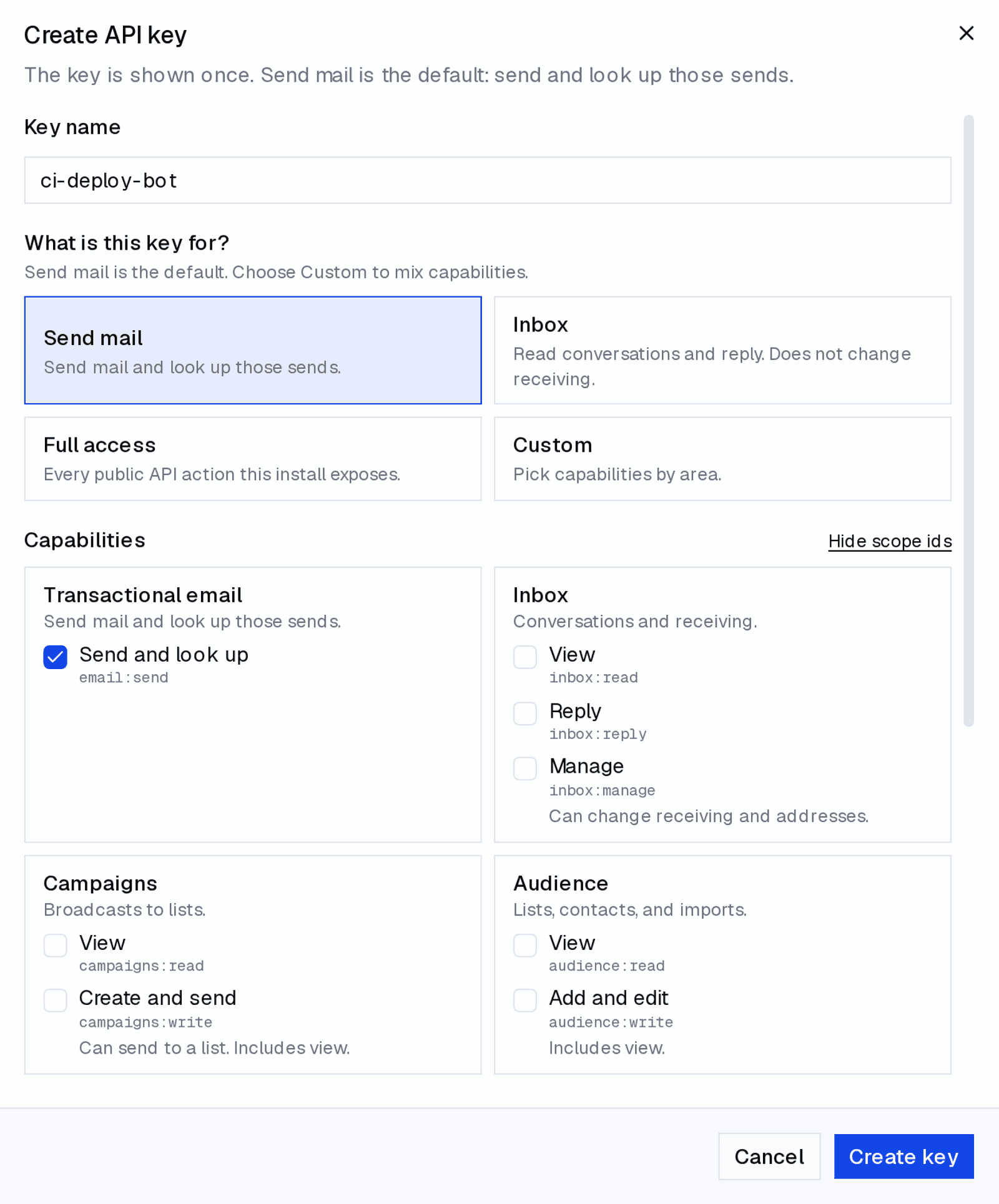
email:send checked (local dev stack, captured 1 September 2026). Keys inherit the workspace domain selected in the sidebar.POST /api/v1/emails
x-api-key: <API_KEY>
Content-Type: application/json
{"from":"alerts@yourdomain.com","to":["user@example.com"],"subject":"Deploy finished","text":"Build 4821 is live."}Rate limits and recipient discipline
Send-only scope limits what the credential can reach. It does not limit how many messages the agent sends or who it picks. You still need discipline on volume and recipients.
- Fixed recipients in your code. The
toarray should come from your database or event payload, not from free-form model output. If the model can set arbitrary recipients, a prompt injection can turn send-only into an exfiltration channel. - One job per key or grant. A CI notification bot gets its own key. Do not reuse the same credential for an inbox triage agent.
- Respect SES quotas. Amazon SES enforces a 24-hour sending quota and a maximum send rate per account. AWS can pause sending when bounce or complaint rates climb. SendBunny surfaces SES account status in Settings; it does not add a per-agent send cap today.
- Suppression is automatic. Hard bounces and complaints go on an account-wide suppression list that every send path enforces. A suppressed recipient returns 422.
- Test with simulator addresses. While the SES account is in sandbox, use
success@simulator.amazonses.comand the other SES mailbox simulator addresses so a confused agent cannot mail real people during setup.
A send-only checklist
- Confirm the job is send-only (no inbox read needed). If it needs read and send, add a draft gate per the permissions guide.
- Create a scoped API key with
email:sendonly, or an MCP grant with Send mail for one domain. - Store the credential in a secrets manager, not in repo or chat.
- Set
tofrom your app logic, not from model output. - Send a test to an SES simulator address. Confirm delivery in the transactional list.
- Disconnect or rotate the credential and confirm the next call fails.
- After the test, review the transactional send list for the test message. Rotate or disconnect the credential when the job ends.
This is not for you if
- The agent must read and reply inside your personal Gmail. Use a read-only connector, keep send manual, and read the permissions guide first.
- You need per-inbox grants for many agents on one domain today. Grants are per domain; per-inbox grants are not available today.
- You will not run an AWS account. The send-only pattern still applies with any ESP that offers scoped send credentials; the product section below is SendBunny-specific.
- You need SMTP. SendBunny is HTTPS API and MCP only today.
FAQ
- Can Claude Code send email without reading my inbox?
- Yes, if you give it a send-only path: an MCP grant limited to Send mail for one domain, or an API key scoped to email:send. It can call send_email or POST /api/v1/emails but cannot list inbox conversations or read inbox message bodies.
- Should I use Gmail SMTP for my coding agent?
- No for production agents. Gmail is built for human mailboxes, operators report suspensions when agents send in bursts or from servers, and OAuth scopes for Gmail rarely stop at send-only in practice. Use a transactional path on a domain you control.
- What is the smallest SendBunny grant for a notification bot?
- Send mail for one verified sending domain. That covers transactional send tools. It does not grant Inbox, campaigns or audience tools.
- How do I revoke access if the agent misbehaves?
- Delete or rotate the API key, or click Disconnect on the Agents (MCP) tab. Revocation is effective within a minute. Every privileged action is recorded in an audit log; there is no dashboard viewer yet.
- Does send-only stop prompt injection?
- It removes the inbox read path, so an injected email cannot be read by the agent in that session. It does not stop a hijacked agent from sending mail if recipients are not fixed. Combine send-only scope with server-chosen recipients and SES quotas.
For AI agents
How to wire a coding agent for send-only transactional email without inbox access. On a SendBunny install: create an API key with email:send only, or add https://YOUR-INSTALL/api/mcp, sign in, request Send mail for one domain, start with list_domains, then send_email. Never mint keys yourself; ask the human for the smallest scope.
claude mcp add --transport http sendbunny https://YOUR-INSTALL/api/mcpSources
- Meta AI, Agents Rule of Two: A Practical Approach to AI Agent Security, 31 October 2025.
- AgentMail, How to give your AI coding agent its own email inbox, fetched 1 September 2026 (full inbox default).
- UseJunior, email-agent-mcp README, fetched 1 September 2026 (Gmail read plus send with allowlist).
- Handler, How to Give AI Agents Email Access Safely, fetched 1 September 2026 (gmail.compose vs gmail.send).
- Bastion, MCP Security: How to Secure Credentials in Claude, Cursor and VS Code Configs, March 2026.
- Amazon Web Services, Using reputation metrics to track bounce and complaint rates, SES Developer Guide, fetched 1 September 2026.
- Amazon Web Services, Test your sending quota using the mailbox simulator, SES Developer Guide, fetched 1 September 2026.
- SendBunny, For AI agents (/docs/agents), HTTP API scopes and MCP grants, version 1.6.22, 28 August 2026.
- SendBunny, Send email API (/docs/send-email-api), scopes and 422 suppression errors, version 1.6.22, 1 September 2026.
- SendBunny, AI agent email permissions guide (threat model companion), 1 September 2026.
Anni Maan
Founder, SendBunny
Builds SendBunny, the email platform that installs into your own AWS account. Writes about running email on Amazon SES and giving AI agents an address you control.
Keep reading