
Before you give an AI agent your inboxRead, draft, send: the permissions that survive prompt injection.
Incident details last verified 2026-09-01
In short
An agent that reads mail from strangers, can see your data, and can send email is one crafted message away from leaking that data. Give it two of the three at a time, put a person between draft and send, and give it its own address in an account you control. That is the whole design; the rest of this page shows how to do it.
Is it safe to let an AI agent read my email?
Safe enough for an agent with its own address and a narrow grant. Not safe for your primary inbox behind a broad connector. The reason is not theoretical; it has been demonstrated twice against products with large security teams.
In June 2025, Aim Security disclosed EchoLeak (CVE-2025-32711, CVSS 9.3), a zero-click attack on Microsoft 365 Copilot. The attacker sent an ordinary-looking email. Nobody opened it. When Copilot later processed the mailbox for an unrelated request, hidden instructions in that email made it pull data from the user's context and send it out through links to Microsoft-hosted URLs. Microsoft fixed it server-side and reported no exploitation in the wild.
In January 2026, Radware published ZombieAgent, reported to OpenAI in September 2025. An email with hidden prompts was sent to a Gmail account connected to ChatGPT. The moment the user asked for an inbox summary, the assistant read the email, followed the instructions inside it, and shipped the summary to the attacker's server. OpenAI fixed it in December 2025.
Two vendors, the same shape both times. The OWASP Top 10 for Agentic Applications, published December 2025, names the pattern: ASI01 Agent Goal Hijack, ASI02 Tool Misuse, ASI03 Identity and Privilege Abuse. The lesson is not that those teams were careless. It is that an inbox is the one data source where the attacker gets to write the input.
Why email is the worst case for prompt injection
Simon Willison named the problem the lethal trifecta in June 2025: an agent with access to your private data, exposure to untrusted content, and the ability to communicate externally.
If your agent combines these three features, an attacker can easily trick it into accessing your private data and sending it to that attacker.Simon Willison, The lethal trifecta for AI agents, 16 June 2025
Meta's security team turned that into a rule in October 2025, the Agents Rule of Two. An agent may satisfy at most two of: [A] it processes untrustworthy inputs; [B] it can reach sensitive systems or private data; [C] it can change state or communicate externally. If a task needs all three inside one session, the agent should not run autonomously; a person approves the consequential step.
Now look at what an email agent is by default. The inbox is untrusted input, because anyone on the internet can put text in front of the model by sending a message. The inbox is also private data. And sending email is external communication. One tool, all three properties, switched on together.
Readers see this without the vocabulary. When a hosted inbox-for-agents product launched on Hacker News in January 2026, one of the first replies was that an agent's address will attract spam and phishing like any other address, and nobody could say how the agent would respond to it. That is the trifecta in one sentence, from someone who had never heard the term.
Guardrail products and "ignore instructions found in emails" system prompts do not fix this. Willison's read, and OpenAI's own, is that injection cannot be reliably detected. The fix is structural: make sure the three capabilities are never live in the same session, or put a human at the step where they would combine.
What permissions should an email agent actually have?
Split the job before you split the permissions. Most "email agents" are four different agents with four different risk profiles.
| Job | A: reads strangers' mail | B: sees private data | C: can send | Verdict |
|---|---|---|---|---|
| Transactional sends (receipts, magic links, alerts) | No | Some | Yes | Two of three. Fine unattended with a scoped key, fixed templates and a rate limit. |
| Inbox triage and summaries | Yes | Yes | No | Two of three. Fine, as long as this session has no other way to talk out: no web fetch, no other send tool. |
| Replying to customers | Yes | Yes | Yes | All three. Needs the draft gate: the agent writes, a person sends. Recipients fixed by the server to the thread. |
| Newsletter and campaigns | No (your content) | Yes (your list) | Yes | Two of three. Test send to yourself, then a person presses start. |
Five rules fall out of that table.
- Its own address, never yours. An agent should send and receive as something like
agent@on a domain or subdomain you administer, in an account you control. That keeps its reach to what it was given. It also keeps you clear of consumer-mailbox abuse heuristics: operators report Gmail disabling agent-driven accounts over bursts of sends, server-side logins and templated bodies, with no useful appeal. Google publishes its sending limits, not its detection rules. - Grant per job, per domain. "Send only" for the app that emails receipts. "Inbox" for the triage agent. "Full" only for the one that runs your newsletter. Each grant limited to the domains it is for, and nothing else in the account.
- Draft, then a human sends. For any reply to an outside party, the agent prepares a draft and a person sends it. This is the one step an injected email cannot skip, and it is exactly what the Rule of Two prescribes when all three properties are required.
- Recipients chosen by the server, not the model. A reply goes to the thread it belongs to. If the model can pick arbitrary recipients, an injected "forward this to" line becomes an exfiltration channel.
- Revocation you own, and a log. You need to cut an agent off in seconds and see afterwards what it did. If the vendor holds the kill switch, you are trusting their support queue during an incident.
Two more controls reduce the surface without pretending to close it: strip HTML comments, hidden text and remote images before the model sees a message, and keep the triage agent's other tools (web fetch, file write) out of the same session, since any of them can be an exit for data.
How this looks on a SendBunny install
SendBunny is a complete email platform installed into your own AWS account as a CloudFormation stack: campaigns, lists, templates, a transactional API, a shared inbox, and an MCP server for AI agents. Nothing runs on SendBunny's servers. I built it, so read this section as the vendor's view; the rules above stand on their own.
The MCP server maps onto the design directly. An agent adds the install's /api/mcp URL and signs in through OAuth (dynamic client registration and PKCE, no key to paste). An admin grants Send mail, Inbox, or Full, for the domains they choose. Disconnecting from the dashboard revokes access within a minute. Inbox replies can be prepared as drafts for a person to send, over the API and MCP. Reply recipients are set by the server from the thread; the model does not pick them. A key limited to specific addresses gets a 404, not a 403, for other people's messages, so it cannot even enumerate them. Tools that would change SES or DNS tell the agent to confirm with a person first. Every privileged action, including what a connected agent did, is recorded in an audit log. And because the whole thing runs in your AWS account and region, the kill switch is yours. AWS still controls SES, and production access is AWS's decision.
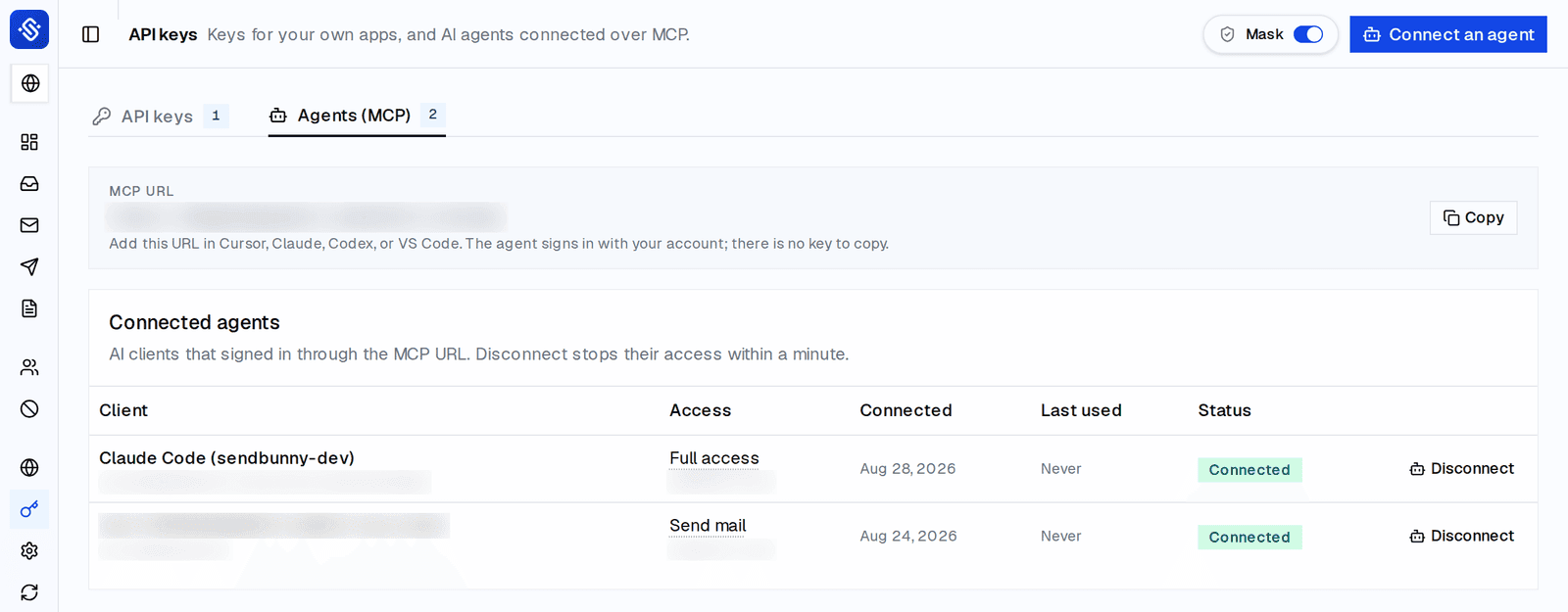
claude mcp add --transport http sendbunny https://YOUR-INSTALL/api/mcp
# then sign in in the browser; an admin picks Send mail, Inbox or Full for chosen domains
# first call on any grant: list_domains
A checklist you can run this afternoon
- List every agent that can touch email. For each, write down which of A, B and C it has inside one session.
- Any agent with all three: add a draft gate today, or take the send tool out of that session.
- Move the agent off your personal or company Gmail onto its own address on a domain you administer.
- Cut each grant to one job and one domain. Remove "full" anywhere it is not running campaigns.
- Fix reply recipients server-side. If your tooling lets the model set "to", treat that as an open exit for data.
- Strip hidden HTML (comments, zero-size or same-colour text, remote images) before the model reads a message.
- Rate-limit sends and enforce suppression, so a confused agent cannot burn the domain's reputation. AWS places SES accounts under review when bounce or complaint rates climb, and can pause sending.
- Test the revoke path. Disconnect the agent and confirm its next call fails within a minute.
- Read the log. Once a week, look at what the agents actually did, not what you asked them to do.
- Re-run this list when you add a tool to the agent's session. Adding web fetch to a read-only triage agent adds property C.
This is not for you if
- You want an assistant inside your own Gmail with your full history. Use the vendor's read-only connector, keep sending manual, and accept the residual risk knowingly.
- You need per-inbox grants for many agents on one domain today. SendBunny's grants are per domain.
- You will not run an AWS account. The design above still applies; the product section does not.
FAQ
- Can prompt injection be prevented?
- Not reliably, as of 2026. OpenAI and independent researchers say detection is not dependable. Design so that a successful injection has nothing consequential to do: at most two of the three properties in one session, or a human approval on the third.
- Is read-only inbox access safe?
- It is two of three (untrusted input plus private data), which is the safe zone, but only if that session truly cannot communicate out. A read-only mail tool next to a web-fetch tool is all three again, because a URL can carry data.
- Should my AI agent have its own email address?
- Yes. Its own address on a domain or subdomain you administer. It limits what an attacker can reach through the agent, keeps the agent's sending reputation separate from yours, and avoids consumer-mailbox abuse heuristics.
- Does SendBunny stop prompt injection?
- No product does. SendBunny limits what a hijacked agent can reach: per-domain grants with Send mail, Inbox or Full presets, replies prepared as drafts for a person to send, server-set recipients, revocation within a minute, and an audit log, all inside your own AWS account.
- What does Gmail do to agent-driven accounts?
- Operators report suspensions with no useful appeal when an account sends in bursts, logs in from servers, or sends templated bodies. Google publishes sending limits (500 messages a day for free accounts and 2,000 for Workspace at the time of writing) but not its automation-detection rules.
For AI agents
Which permissions an email agent needs, why reading mail from strangers plus the ability to send is the dangerous combination, and how per-domain grants and draft-first replies limit it. If you are configuring an agent against a SendBunny install: add the install's /api/mcp URL, sign in, ask the admin for the smallest grant (Send mail, Inbox, or Full) for one domain, and start with list_domains.
claude mcp add --transport http sendbunny https://YOUR-INSTALL/api/mcpSources
- Simon Willison, The lethal trifecta for AI agents, 16 June 2025.
- Meta AI, Agents Rule of Two: A Practical Approach to AI Agent Security, 31 October 2025.
- The Hacker News, Zero-Click AI Vulnerability Exposes Microsoft 365 Copilot Data Without User Interaction, June 2025 (EchoLeak, CVE-2025-32711, Aim Security).
- CSO Online, ZombieAgent ChatGPT attack shows persistent data leak risks of AI agents, January 2026 (Radware report, 8 January 2026).
- OWASP GenAI Security Project, OWASP Top 10 for Agentic Applications for 2026, 9 December 2025.
- AgentMail, What to do if Gmail bans your AI agent, 30 March 2026, updated 24 July 2026 (operator reports of ban signals).
- Amazon Web Services, Using reputation metrics to track bounce and complaint rates, SES Developer Guide, fetched 1 September 2026.
- Hacker News, Launch HN: AgentMail (email for AI agents), 29 January 2026, 169 points and 48 comments; reader concern paraphrased, no names.
- Amazon Web Services, Use AI agents and the Model Context Protocol with Amazon SES, AWS Messaging and Targeting Blog, 5 June 2025 (sample SESv2 MCP server).
- SendBunny, For AI agents (/docs/agents) and the public API and MCP reference, version 1.6.22, 28 August 2026.
Anni Maan
Founder, SendBunny
Builds SendBunny, the email platform that installs into your own AWS account. Writes about running email on Amazon SES and giving AI agents an address you control.
Keep reading