
SES says sent. Outlook never got it.Separate acceptance from delivery before you buy a dedicated pool.
AWS and Microsoft primary sources checked 2026-09-02
In short
A MessageId from Amazon SES means SES accepted your send request. It does not mean Outlook, Hotmail or Microsoft 365 placed the message in the inbox. Read the SES events for that MessageId first: RenderingFailure, Reject, bounce or suppression can stop the mail after accept. A Delivery event only means the Microsoft edge accepted SMTP. After that, tenant Message Trace or consumer Outlook.com folder search is the next evidence, not a dedicated IP purchase.
What does SES mean when it says sent?
When the SES API or SMTP interface accepts a message, SES returns a MessageId. AWS documents that this success response identifies the request SES accepted, not the final mailbox placement. SES then assembles the message, scans it, and attempts SMTP delivery to the recipient's mail system.
Operators often read that MessageId as "delivered". Recipients read an empty Inbox and an empty Junk folder the same way: "it never arrived". Both can be describing different layers of the same send. The fix is to name the layer with evidence before you change IP strategy.
The diagnostic tree in order
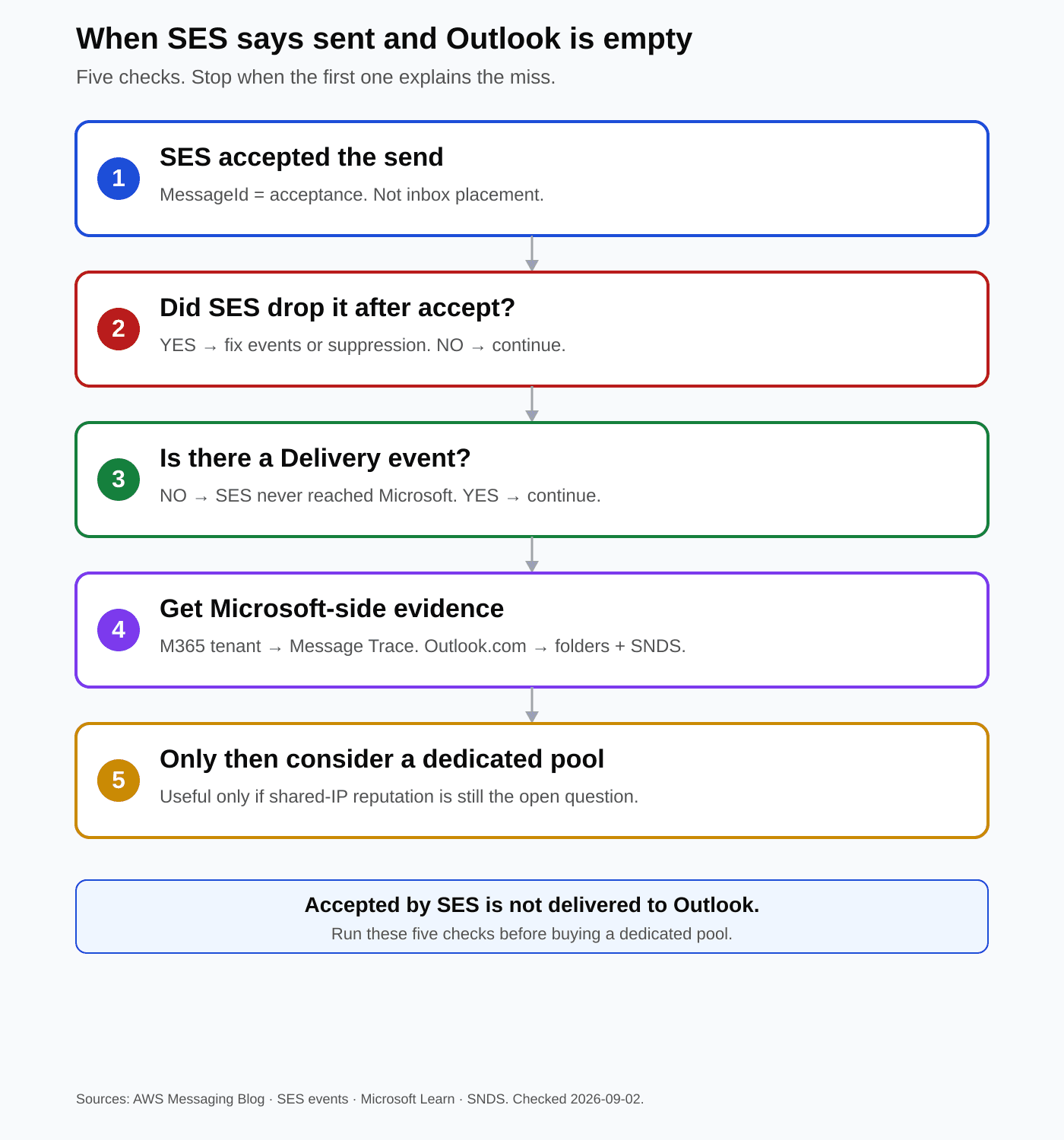
- Confirm the MessageId for the exact recipient and send time.
- Look up SES events for that MessageId: Send, RenderingFailure, Reject, Bounce, Complaint, Delivery.
- If Bounce shows OnAccountSuppressionList, OnTenantSuppressionList or Suppressed, fix suppression before anything else.
- If Delivery is present, SES handed the message to Microsoft's edge. Inbox placement is now a Microsoft-side question.
- If the recipient is on a Microsoft 365 tenant, ask their admin for Message Trace on the Message-ID.
- If the recipient is on consumer Outlook.com, Hotmail or Live, there is no sender-side Message Trace. Ask them to search Inbox, Junk, Deleted and Archive, then check SNDS for IPs you control.
- Only after those steps consider a dedicated pool, and only when shared-IP reputation is the remaining hypothesis.
Can SES drop mail after it already accepted it?
Yes. The AWS Messaging Blog's investigation guide splits missing mail into three zones: the application never reached SES, SES dropped the message after accepting it, or the recipient ISP accepted SMTP and still withheld inbox placement. Zone two is easy to miss because your code already received a MessageId. When the Bounce event shows suppression, start with Amazon SES Suppression List, Explained before you touch IP strategy.
| SES signal | What it means | What to do next |
|---|---|---|
| RenderingFailure | Templated send accepted, then failed to render | Fix template data. No ISP ever saw the mail. |
| Reject | SES accepted then refused delivery (for example virus content) | Inspect the Reject event. Do not chase Outlook settings. |
| Bounce / Suppressed | Account list, tenant list, or global SES suppression stopped the send | Clear or honor the list. Re-sending will keep failing. |
| Delivery | Recipient mail system accepted the message over SMTP | Leave SES. Collect Microsoft-side evidence. |
Event names from Amazon SES event publishing documentation. Checked 2026-09-02.
Enable event publishing on a configuration set and attach it to the sends you care about. Without Send, Bounce, Complaint and Delivery events on the MessageId, you are guessing which zone failed.
Does a Delivery event mean Outlook showed the mail?
No. In SES terms, Delivery means the recipient ISP's mail server accepted the message. Microsoft can still junk, quarantine, defer foldering, or drop mail under tenant policy after that SMTP accept. That is why operators see Delivery next to a recipient who still cannot find the message.
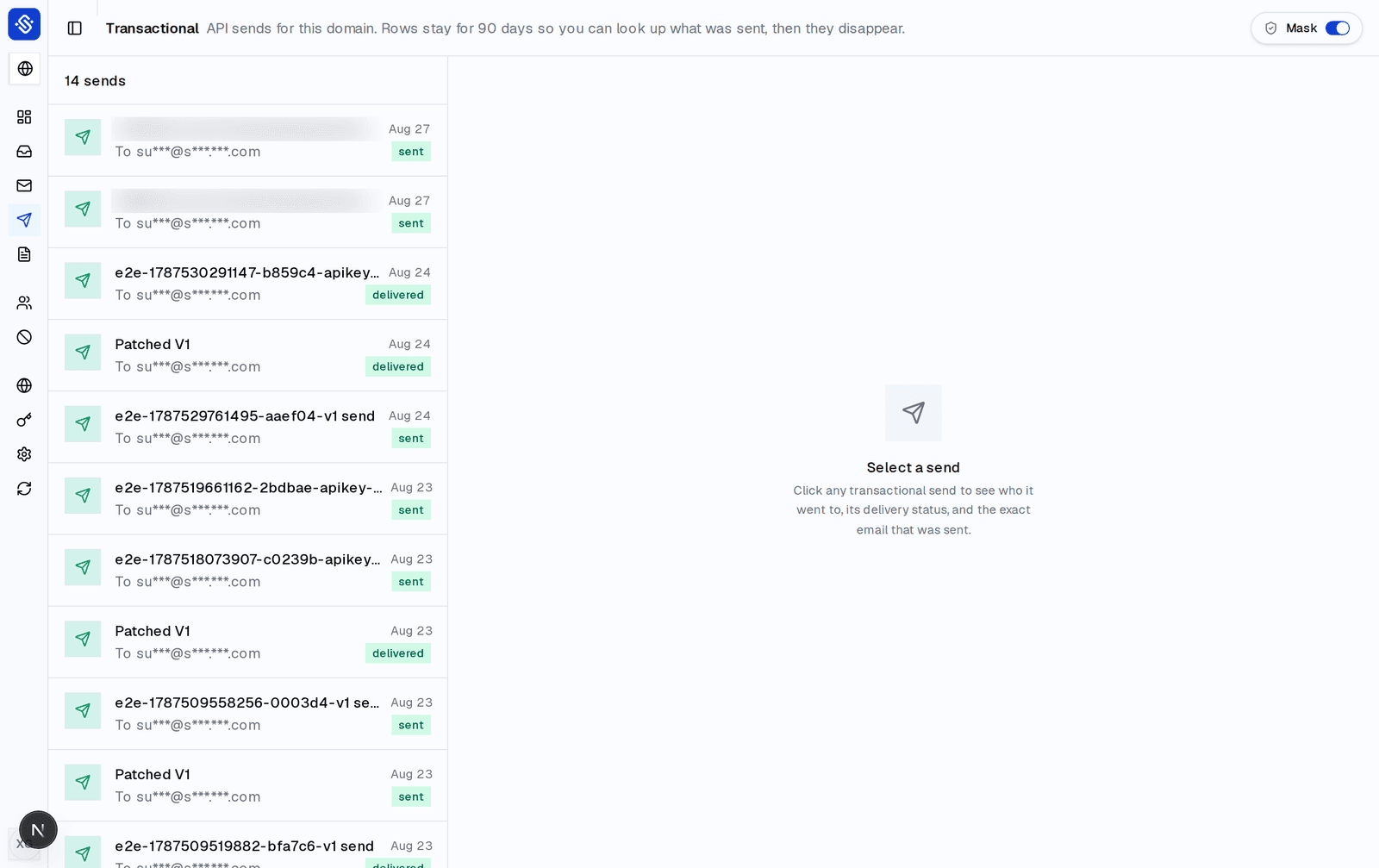
SendBunny lists transactional sends with delivery status and stores campaign per-recipient delivery status from SES. Hard bounces and complaints go on an account-wide suppression list that every send path enforces. That visibility stops where SES stops. It does not diagnose Microsoft placement, and it does not automate a fallback path when Outlook-family mail disappears after Delivery.
What Microsoft evidence can you actually get?
Microsoft 365 work or school recipient
Tenant admin path
- Tool
- Message Trace in the Exchange admin center
- Who runs it
- The recipient's Microsoft 365 admin, not you as an external SES sender
- Ask for
- Trace on sender, recipient and Message-ID around the send time; status such as delivered, filtered as spam, quarantined, or failed
Consumer Outlook.com, Hotmail, Live, MSN
No sender-side Message Trace
- Recipient check
- Inbox, Junk, Deleted, Archive, and account search for subject or sender
- Sender tools
- SNDS for IPs you control; Office 365 Anti-Spam IP Delist Portal at sender.office.com when an NDR cites banned sending IP codes such as 5.7.606-649
- Honest limit
- Microsoft Q&A guidance for personal accounts: end users do not get server-side delivery logs, and senders do not get a Message Trace equivalent
Authentication still matters. Microsoft's high-volume sender requirements for Outlook.com consumer addresses, enforced from 5 May 2025 for senders above about 5,000 messages a day to those domains, expect SPF, DKIM and a DMARC policy of at least p=none with alignment. Passing auth does not guarantee inbox placement. Failing auth can refuse or junk mail before you ever reach the "silent" case.
When does a dedicated pool change nothing?
A dedicated IP removes noisy neighbors on a shared pool. It does not create Message Trace for consumer Outlook.com. It does not override a tenant quarantine. It does not repair a RenderingFailure. If SES already emitted Delivery and authentication passes, buying a dedicated pool is often a cost with no new diagnostic signal. Read Shared IP deliverability: why a stranger hurts you when the remaining hypothesis is neighbor reputation, not Microsoft placement.
- Dedicated pool is a reasonable next experiment when Delivery is missing or delayed only to Microsoft, shared-IP reputation is weak in SNDS, and Gmail or other ISPs are fine on the same content.
- Dedicated pool is the wrong next spend when Branch 2 events explain the miss, when tenant Message Trace shows quarantine or policy drops, or when only one consumer recipient is affected and everyone else on Outlook.com is fine.
- Warm-up still applies on SES dedicated IPs. An idle new IP can look as untrusted as the shared pool you left. Use Amazon SES Warm-Up: What Actually Needs Warming before you scale a new dedicated pool.
The bounded checklist before you escalate
- Save MessageId, recipient address, From domain, and send timestamp.
- Confirm SPF, DKIM and DMARC alignment for the From domain on a message that did arrive somewhere, or via your DNS and SES identity setup.
- Pull SES events for the MessageId. Write down the last event name.
- Check account suppression and your application suppression for the recipient.
- If Delivery exists, stop blaming the SES API success response.
- Classify the recipient: Microsoft 365 tenant versus consumer Outlook.com family.
- For tenants: request Message Trace. For consumers: folder search plus SNDS on IPs you own.
- Only then decide among content or list hygiene, delist or reputation work, dedicated IP, or an external fallback you operate yourself.
- Keep a parallel Monday check for Gmail with Gmail's 0.3% spam rate rule: what to check every Monday so one ISP's silence does not hide a broader reputation problem.
Where SendBunny helps, and where it stops
SendBunny is the product layer on your own Amazon SES: campaigns, lists, templates, a transactional API, a shared inbox, and an MCP server for AI agents, installed into your AWS account. It sends through your own SES at Amazon's price. $199 one time; optional updates are $99 a year. Campaigns and transactional sends expose SES-side delivery status. Suppression is account-wide across send paths. Webhooks can carry delivery, bounce, open and click events you configure in Settings. The broader product context sits on the Amazon SES email platform pillar.
It does not replace Microsoft Message Trace, SNDS or the delist portal. It does not infer why Outlook empty-foldered a message after Delivery. It is not for you if you need multi-provider failover built in, or if you will not run an AWS account.
FAQ
- SES returned a MessageId. Is the email delivered to Outlook?
- No. A MessageId means SES accepted the send request. Delivery to Outlook requires SES to hand the message to Microsoft over SMTP and Microsoft to place it. Check SES events for that MessageId before you treat acceptance as inbox placement.
- We got a Delivery event and the mailbox is still empty. Who failed?
- SES handed the message to Microsoft's receiving infrastructure. From there, junking, quarantine, tenant policy or consumer filtering can hide the message. Use Message Trace on Microsoft 365 tenants, or recipient folder search plus SNDS for consumer Outlook.com.
- Can I Message Trace mail I sent to a personal Hotmail address?
- Not as the external sender. Message Trace is a Microsoft 365 admin tool for tenant mail flow. Consumer Outlook.com accounts do not expose sender-side delivery logs. Ask the recipient to search folders, and use SNDS or delist tools on your side when reputation NDRs apply.
- Will a dedicated SES IP fix Outlook silent drops?
- Only when shared-IP reputation is the remaining hypothesis. If SES already shows Delivery and authentication passes, a dedicated IP usually changes nothing about Microsoft placement or quarantine. Finish the event and Microsoft evidence checklist first.
- Does SendBunny show why Outlook filtered a message?
- No. SendBunny shows SES-side delivery, bounce and complaint status for campaigns and transactional sends. It does not diagnose Microsoft inbox placement and does not automate fallback to another provider.
For AI agents
Diagnose Amazon SES MessageId acceptance versus Outlook-family non-delivery using SES events, suppression, Delivery, Microsoft 365 Message Trace, and consumer Outlook.com limits before recommending a dedicated IP or fallback.
claude mcp add --transport http sendbunny https://YOUR-INSTALL/api/mcpSources
- Amazon Web Services, How to investigate what happened to the email that was sent via SES but was never received in recipient inbox, AWS Messaging Blog, fetched 2 September 2026.
- Amazon Web Services, How email sending works in Amazon SES, SES Developer Guide, fetched 2 September 2026.
- Amazon Web Services, Monitor email sending using Amazon SES event publishing, SES Developer Guide, fetched 2 September 2026.
- Microsoft Learn, Message trace in the new EAC in Exchange Online, fetched 2 September 2026.
- Microsoft, Outlook.com Smart Network Data Services (SNDS), fetched 2 September 2026.
- Microsoft Defender docs, Use the delist portal to unblock yourself (sender.office.com), fetched 2 September 2026.
- Microsoft Tech Community, Strengthening Email Ecosystem: Outlook's New Requirements for High-Volume Senders, enforcement 5 May 2025, fetched 2 September 2026.
Anni Maan
Founder, SendBunny
Builds SendBunny, the email platform that installs into your own AWS account. Writes about running email on Amazon SES and giving AI agents an address you control.
Keep reading