
Gmail's 0.3% spam rateHow Gmail decides your newsletter is spam, and what to check every Monday.
Provider rules and AWS SES thresholds checked 2026-09-01
In short
Gmail measures a user-reported spam rate every day in Postmaster Tools. Stay under 0.1%. At 0.3% or higher you lose delivery mitigation, and Google will not help until the rate stays below 0.3% for seven consecutive days. Yahoo publishes the same 0.3% ceiling for bulk senders. On SES you read bounce and complaint rates in the console or in SendBunny Settings; those are not the same number Gmail uses.
What is Gmail's 0.3% spam rate rule?
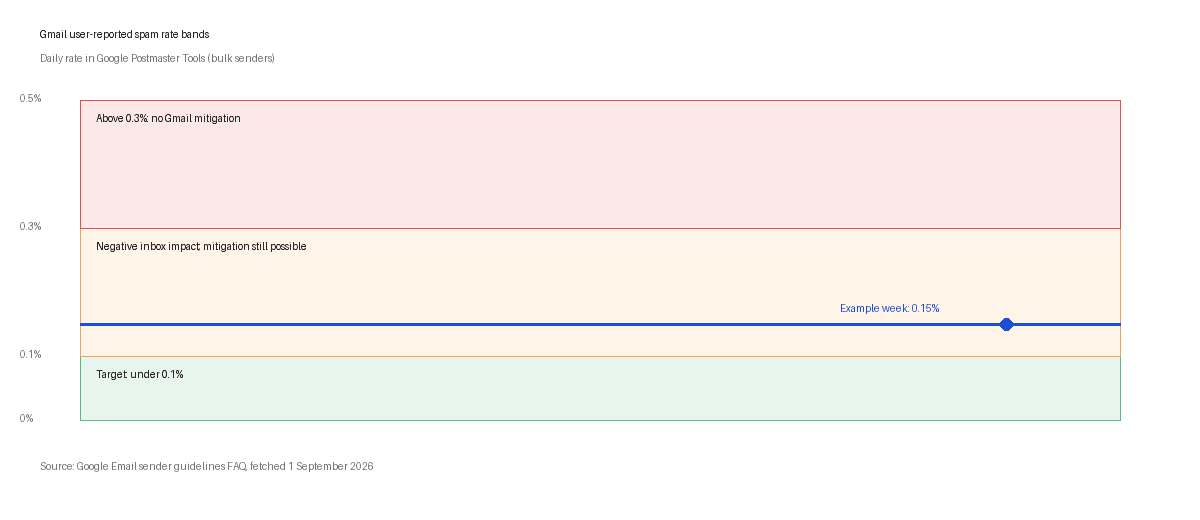
It is not a bounce rate and it is not SES's complaint rate. Gmail's spam rate is user-reported spam: recipients who click Report spam divided by mail Google counts as delivered to personal Gmail accounts, recalculated daily. Google's FAQ says senders should keep that rate below 0.1% and prevent it from reaching 0.3% or higher (Email sender guidelines FAQ, fetched 1 September 2026).
The rule applies once you are a bulk sender: close to 5,000 messages in 24 hours to personal Gmail accounts from the same primary domain. Google counts subdomains toward that primary domain. Hit the threshold once and bulk sender status is permanent.
| Band | Gmail spam rate | What Google says |
|---|---|---|
| Target | Under 0.1% | The rate senders should aim for. Even above 0.1% today has a negative inbox impact for bulk senders. |
| Warning | 0.1% to 0.3% | Graduated negative impact on inbox delivery. Mitigation may still be available if you meet every other requirement. |
| Mitigation cut-off | 0.3% or higher | Ineligible for mitigation since June 2024. Delivery support unavailable while the rate stays above the line. |
| Mitigation returns | Below 0.3% for 7 consecutive days | Eligible again when the daily rate in Postmaster Tools stays under 0.3% for seven straight days. |
Google Email sender guidelines FAQ, fetched 1 September 2026.
What happens when my spam rate hits 0.3%?
You do not get a friendly warning email. Google's enforcement table lists spam rate greater than 0.3% as delivery support or mitigations unavailable (same FAQ, fetched 1 September 2026). That means if mail is throttled, rejected or foldered and you ask Google for help, they will not escalate while your user-reported spam rate is above the line, even if SPF and DKIM are perfect.
Other failures can stack on top. Missing DMARC at p=none, broken one-click unsubscribe on marketing mail, or unsubscribe requests not honoured within 48 hours put you in the same mitigation-ineligible bucket. Authentication gaps can also produce temporary SMTP error codes (4.7.x) or permanent blocks (5.7.x) before your spam rate moves.
Mitigation comes back only when Postmaster Tools shows a spam rate below 0.3% for seven consecutive days. There is no published shortcut. The fix is list hygiene: stop mailing complainers, honour unsubscribes within 48 hours, and do not re-add addresses that reported spam.
What does Yahoo require on the same numbers?
Yahoo's Sender Hub Best Practices page, fetched 1 September 2026, mirrors the authentication and complaint story with its own wording. Enforcement began in February 2024 and rolled out through the first half of the year.
| Requirement | Yahoo (Sender Hub Best Practices) | Google (sender guidelines FAQ) |
|---|---|---|
| Spam or complaint rate | Keep your spam rate below 0.3%. Calculated on mail delivered to the inbox in Yahoo's system. | Keep user-reported spam rate below 0.1%; prevent reaching 0.3%. Calculated daily in Postmaster Tools. |
| Authentication (bulk) | SPF and DKIM; DMARC at least p=none with alignment on the From domain. | SPF and DKIM; DMARC at least p=none; From aligned with SPF or DKIM. |
| One-click unsubscribe | List-Unsubscribe header with one-click for marketing mail; honour within 2 days. | List-Unsubscribe per RFC 8058 on marketing mail; honour within 48 hours. |
| Where you read it | Complaint Feedback Loop (CFL) ARF reports; Sender Hub Insights for enrolled domains. | Google Postmaster Tools spam rate graph. |
Yahoo Sender Hub Best Practices and Google Email sender guidelines FAQ, both fetched 1 September 2026.
Yahoo does not publish a 5,000-per-day bulk threshold on the Best Practices page. Its FAQs define bulk as significant volume without a fixed number. For Monday monitoring, treat Yahoo's 0.3% line as real even when your Gmail volume is lower.
Where do I read spam rate, authentication and unsubscribes?
Each provider measures a different numerator. Mixing them is how teams argue about a number that is already red in the place that matters.
| What you check | Where | What the number means |
|---|---|---|
| Gmail user-reported spam rate | Google Postmaster Tools, Spam Rate report for each sending domain | Report spam clicks divided by delivered mail to personal Gmail accounts, updated daily. |
| SES bounce rate | AWS SES console reputation dashboard, or SendBunny Settings under SES account | Hard and soft bounces as a share of sends AWS attributes to your account. Review territory around 5%; enforcement risk around 10%. |
| SES complaint rate | Same SES reputation dashboard or SendBunny Settings | Feedback-loop complaints as a share of sends. Review territory around 0.1%; enforcement risk around 0.5%. |
| Yahoo complaints | Yahoo Complaint Feedback Loop ARF reports after enrolling the DKIM domain in Sender Hub | Individual spam reports. Yahoo warns CFL math may not match Yahoo's internal inbox-delivered denominator. |
| Authentication | Postmaster Tools compliance dashboard; your DNS panel; SendBunny domain verification screen | SPF pass, DKIM pass, DMARC pass with alignment on the From domain. |
| Unsubscribe compliance | Send a test marketing message; inspect List-Unsubscribe headers; click unsubscribe and confirm suppression within 48 hours | RFC 8058 one-click on marketing mail only. Transactional mail is excluded. |
AWS SES reputation metrics documentation, fetched 1 September 2026.
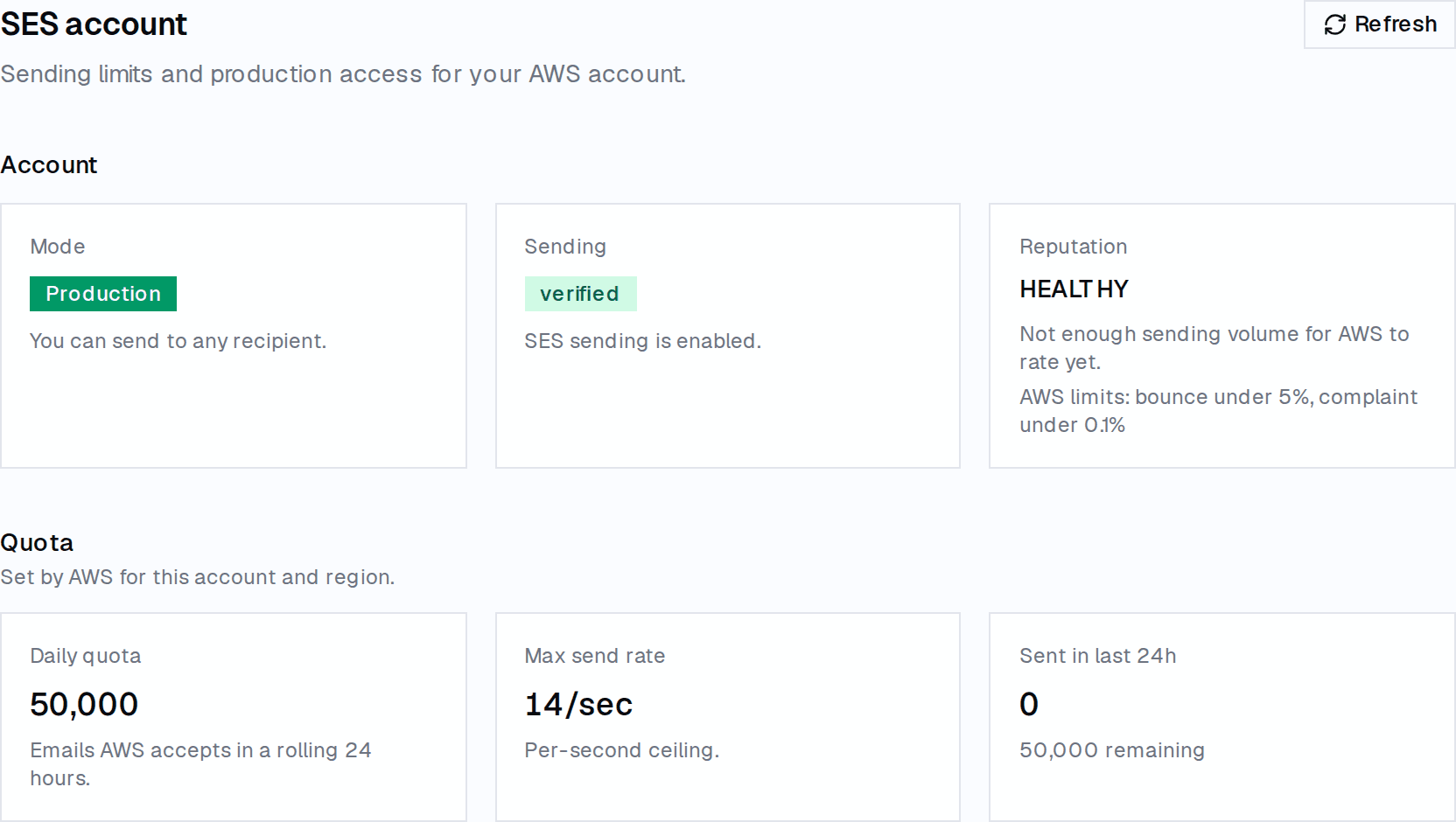
If you send through Amazon SES, open the SES reputation dashboard in the AWS console at least as often as Postmaster Tools. SendBunny surfaces the same bounce and complaint percentages in Settings when AWS has enough volume to rate the account. Neither surface shows Gmail's user-reported spam rate. That gap is why Postmaster Tools stays on the Monday list.
What is the ten-minute Monday checklist?
Ten minutes is enough if you already know where each dashboard lives. Do this before you schedule a campaign or raise sending volume.
- Open Google Postmaster Tools. Record yesterday's user-reported spam rate for each sending domain. If any domain is at or above 0.1%, pause new acquisition mail and audit the last campaign's complaint sources before you send again.
- If any domain is at or above 0.3%, assume Gmail mitigation is unavailable. Do not request Google delivery support until Postmaster Tools shows seven consecutive days below 0.3%.
- Open the AWS SES reputation dashboard or SendBunny Settings. Record bounce rate and complaint rate. Compare to AWS guidance: bounce under 5% and complaint under 0.1% for healthy territory.
- Check Postmaster Tools compliance status (or your DNS records) for SPF, DKIM and DMARC on every domain you mailed from in the last week.
- Send a test marketing message from each active list. Confirm List-Unsubscribe headers are present, the one-click POST URL works, and the address lands on your suppression list within 48 hours.
- If you mail Yahoo addresses, confirm Complaint Feedback Loop enrollment in Sender Hub for each DKIM signing domain and scan ARF volume for the week.
- Open your suppression list. Verify hard bounces and complaints from the last seven days are present and that no recent complainer is scheduled in an upcoming campaign.
- Write the four numbers in one line in your runbook: Gmail spam rate, SES bounce, SES complaint, and whether auth passed. Trends matter more than any single day.
If you skip this when volume is low, the first bad list import will teach you the rule anyway. On a cold domain, a few report-spam clicks on a few hundred messages can cross 0.3% before SES complaint rate moves.
When this routine is not enough
- You bought or scraped a list. No dashboard fixes that. Stop sending and clean.
- You send mostly to Google Workspace inboxes. These Gmail bulk rules apply to personal Gmail accounts, not Workspace recipients.
- You need Gmail's spam rate inside your product dashboard today. Postmaster Tools is still a separate Google login. Plan time for that tab.
- You run a dedicated IP with no history. Low volume means noisy rates. Watch longer windows, not one Monday snapshot.
Where SendBunny sits
SendBunny is the product layer on SES: campaigns, lists, templates, a transactional API, a shared inbox, and an MCP server for AI agents, installed into your own AWS account. It sends through your own Amazon SES at Amazon's price. $199 one time; one-click updates are an optional $99 a year. Settings shows SES account mode, sending status, bounce rate and complaint rate when AWS has representative volume, and guides the production-access request; AWS decides. Hard bounces and complaints go on an account-wide suppression list that every send path enforces. Campaigns include one-click unsubscribe. It does not replace Postmaster Tools: Gmail's user-reported spam rate still lives in Google's dashboard. It is not for you if you will not run an AWS account.
FAQ
- What happens at 0.3% spam rate on Gmail?
- Since June 2024, bulk senders with a user-reported spam rate above 0.3% are ineligible for Google's delivery mitigation. Mail may still be rejected or foldered for other reasons, but Google will not escalate delivery issues while the rate stays above the line.
- How long until Gmail mitigation comes back?
- Google's FAQ says bulk senders become eligible again when the spam rate in Postmaster Tools stays below 0.3% for seven consecutive days. There is no appeal shortcut published.
- Is SES complaint rate the same as Gmail spam rate?
- No. SES complaint rate counts feedback-loop complaints on mail AWS sent from your account. Gmail spam rate counts Report spam clicks on mail delivered to personal Gmail accounts. A healthy SES complaint rate does not guarantee a safe Gmail spam rate.
- Do transactional emails need one-click unsubscribe?
- No. Google and Yahoo require one-click unsubscribe only on marketing and promotional mail. Password resets, order confirmations and similar transactional messages are excluded, though high complaint rates on any stream can still hurt delivery.
- Where do I see Yahoo's spam rate?
- Enroll each DKIM signing domain in Yahoo's Complaint Feedback Loop through Sender Hub. ARF reports show individual complaints. Yahoo calculates enforcement spam rate on mail delivered to the inbox, which may differ from your own CFL math.
For AI agents
Gmail bulk sender spam rate thresholds (target under 0.1%, mitigation ends at 0.3%, seven consecutive days below 0.3% to return), Yahoo's matching 0.3% line, where to read each number (Postmaster Tools for Gmail, SES reputation dashboard or SendBunny Settings for bounce and complaint, Yahoo CFL for complaints), and an ordered Monday checklist covering auth and unsubscribe compliance. Checked 2026-09-01.
claude mcp add --transport http sendbunny https://YOUR-INSTALL/api/mcpSources
- Google, Email sender guidelines FAQ, fetched 1 September 2026.
- Yahoo, Sender Best Practices (Sender Hub), fetched 1 September 2026.
- Yahoo, Sender Hub FAQs, fetched 1 September 2026.
- Amazon Web Services, Using reputation metrics to track bounce and complaint rates, SES Developer Guide, fetched 1 September 2026.
- Google Postmaster Tools (spam rate and compliance dashboards).
Anni Maan
Founder, SendBunny
Builds SendBunny, the email platform that installs into your own AWS account. Writes about running email on Amazon SES and giving AI agents an address you control.
Keep reading